

How to Activate Valet Mode and Protect Personal Data in Your 2026 Hyundai Vehicle
Handing your keys to a valet at a Columbia, SC restaurant or dropping your car off at a service center feels routine, but your 2026 Hyundai stores contact lists, navigation history, call logs, and saved driver profiles. That’s where Hyundai Valet Mode setup becomes genuinely useful. It’s a built-in privacy feature that keeps your personal information hidden while still letting someone else drive. If you’d like a walkthrough before trying it yourself, contact our team to schedule a hands-on demo at Stivers Hyundai.
What Is Hyundai Valet Mode and Why It Matters for Your Privacy
Today’s Hyundai infotainment systems sync with your phone, remember your favorite destinations, and save preferences directly tied to your driver profile. When a valet, service attendant, car wash attendant, or anyone else takes the wheel, all of that data is potentially accessible without added protection.
Valet Mode puts your vehicle into a restricted-access state that limits what someone else can see or interact with on your infotainment system. Your car can still be driven normally, but sensitive personal information stays hidden behind a PIN or password. It’s a practical privacy layer that many Hyundai owners don’t discover until they actually need it.
What Personal Data Valet Mode Restricts
When you activate Valet Mode, the infotainment screen and buttons are locked so a guest driver cannot access stored personal data. Hyundai protects your personal information by disabling control using the screen or buttons, preventing a guest driver from interacting with stored data. Connected app activity and driver profile preferences are blocked as well.
Valet Mode also lets you review certain vehicle-use data afterward, including the time Valet Mode was activated, the time the engine stopped, driving distance, driving duration, and the highest speed reached. That’s a useful record if you want to know how your car was handled while out of your hands.
Which 2026 Hyundai Models and Trims Support Valet Mode
Hyundai documents Valet Mode as an ‘if equipped’ feature. Availability is determined by your vehicle’s infotainment system and Bluelink subscription, not by the model name alone. The feature is built into Hyundai’s Gen5 and Gen5 Wide navigation systems and requires the Bluelink app with an active Bluelink subscription to use, since vehicle data is monitored through the app while the infotainment screen is locked.
If you’re considering a new purchase and privacy protection is a priority, our Stivers Hyundai sales team can confirm which 2026 configurations include this feature. You’re also welcome to explore financing options during your visit.
Step 1: Set Up Your Valet Mode PIN
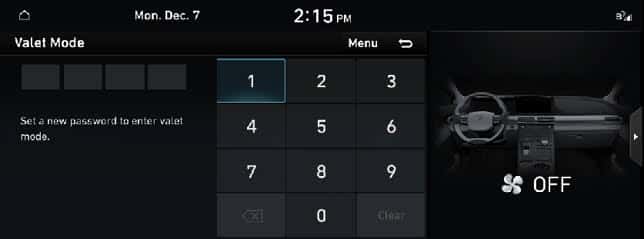
Before you can use Valet Mode, you need to create a passcode or password through your vehicle’s infotainment system. From the Home screen, tap All Menus, then select Valet Mode. Enter a new password or passcode when prompted, then re-enter it to confirm. The owner’s manual uses the term ‘password’ when describing Valet Mode setup; follow whatever prompt appears on your own screen.
Set this up as soon as you get your vehicle rather than scrambling to do it in a parking garage with a valet waiting. The process takes under two minutes, and you only need to do it once unless you choose to change it later.
Step 2: Enable Valet Mode Before Handing Over Your Keys
With your passcode already created, activating Valet Mode before a handoff is quick. From Home, tap All Menus, select Valet Mode, and follow the on-screen prompt. Once confirmed, the infotainment system transitions into restricted mode. Your personal information is now protected from whoever is driving, as screen and button controls are disabled.
One practical tip: enable Valet Mode before you arrive at the drop-off lane, whether that’s a valet stand at a Columbia, SC event venue or a service check-in, so you’re not fumbling with the touchscreen at the last moment.
Step 3: Disable Valet Mode When You Return to Your Vehicle
Once you’re back in the driver’s seat, open Valet Mode and enter your password to deactivate it. Your full infotainment experience, including navigation history, saved contacts, and driver preferences, returns exactly as you left it. Valet Mode can also be turned off through the Bluelink app on linked vehicles, which is handy if you want to deactivate it remotely before you even reach the car.
Make it a habit to disable Valet Mode before pulling out of the lot so you’re not locked out of your own navigation mid-drive.
Troubleshooting Hyundai Valet Mode Problems
Most of the time, Valet Mode works without a hitch. When small issues do come up, the fixes are straightforward.
What to Do If You Forgot Your Valet Mode PIN
Forgetting your Valet Mode password is more common than you’d think, especially if you set it up once and didn’t use it again for months. After five incorrect attempts, deactivation on the vehicle screen is blocked for security. At that point, Hyundai directs owners to reset via the Bluelink app, or you can call the Bluelink Center directly at 855-2-BLUELINK / 855-225-8354 for assistance.
To avoid this situation entirely, store your PIN somewhere secure, such as a password manager or a locked notes app on your phone, rather than relying on memory alone.
Valet Mode Option Not Appearing in Your Infotainment Menu
If the Valet Mode option simply isn’t visible in your menus, the most likely explanation is that your vehicle isn’t equipped, or that full functionality requires an active Bluelink account and the MyHyundai with Bluelink app. Check whether your account is active and the app is linked. If everything looks connected and the option still doesn’t appear, your specific trim may not support the feature. Your owner’s manual will confirm this, and our team is happy to help clarify.
Get a Hands-On Valet Mode Demo at Stivers Hyundai
Reading through the steps is helpful, but seeing Valet Mode in action on an actual vehicle makes the process clear right away. At Stivers Hyundai, we’re happy to walk you through a live demonstration on a 2026 model so you can see exactly how the interface looks, how the passcode setup works, and what changes when the mode is active.
Whether you’re a current owner looking to use a feature you’ve overlooked, or you’re considering a new purchase and want to see how privacy features work in person, we make that easy. Contact our team to set up a tech demo visit at a time that works for you.
With proper Hyundai Valet Mode setup, your 2026 vehicle already has everything you need to protect your personal data built right in.
Images by OEM
0 comment(s) so far on How to Activate Valet Mode and Protect Personal Data in Your 2026 Hyundai Vehicle